Blog › Cleaning Schedule
Cleaning ScheduleAirbnb Cleaning Schedule with Smoobu: How to Avoid Missed Turnovers
A cleaning that's missed or poorly coordinated between one guest's departure and the next one's arrival is one of the few operational mistakes a guest never forgives. Unlike a slow reply or a small inaccuracy in the listing, an apartment that isn't ready at check-in time almost always means a one-star review — and sometimes a refund. It's also, very often, the first warning sign that a concierge business is managing more properties than its current tools can handle.
And yet most concierge businesses still run their cleaning schedule on a spreadsheet or through a string of WhatsApp messages with their cleaners — a method that works fine, right up until the day it doesn't, especially once the dates are coming from a channel manager like Smoobu and have to be copied across by hand.
The short answer: connect Smoobu and the schedule looks after itself
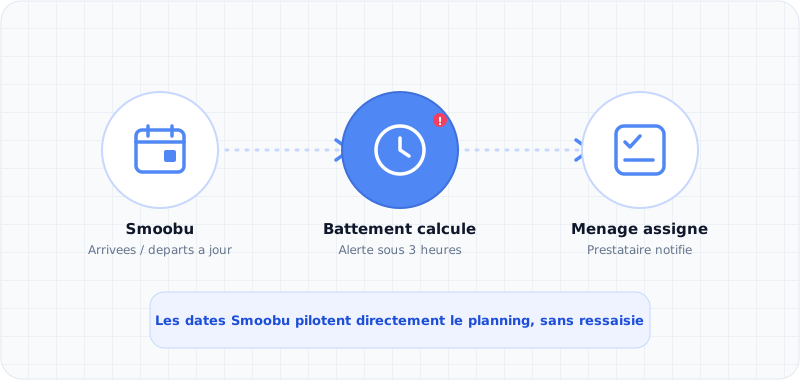
Let's start with the answer here too: once your properties are connected to Smoobu, Trackivo reads the synced check-in and check-out dates directly, automatically works out the gap available between two stays, and triggers a visual alert as soon as it drops below the danger threshold — with nothing for you to copy by hand. One connection is enough to keep the cleaning schedule for every property up to date on its own.
The rest of this article looks at why cleaning is so often the first operational breaking point for a growing concierge business, then how Trackivo connects the schedule, the field, and your supply list.
Cleaning is never an isolated task
This is the most common mistake in scheduling: treating cleaning as a standalone task, disconnected from everything else. In reality, every cleaning job depends on at least three things that are constantly shifting: the outgoing guest's actual departure time, the incoming guest's arrival time, and the gap available between the two. A four-hour gap is no problem at all. A ninety-minute gap, on the other hand, calls for tightly planned logistics — and needs to be visible immediately, not discovered the night before.
On top of that, there's a field reality that simplified tools often overlook: a cleaner who notices on-site that they're out of coffee, toilet paper or a lightbulb needs to be able to flag it right away, and that flag needs to turn automatically into an action — something to buy before the next arrival — rather than getting buried in a fifty-message WhatsApp thread.
Take a concrete example. One guest checks out at 10am, the next checks in at 4pm: a six-hour gap, plenty of time. But that same day, on another property in your portfolio, an 11am check-out is followed by a 1pm check-in — ninety minutes to clean a three-room apartment, change the linen and check the equipment. Without an automatic alert, these two situations look identical on a standard spreadsheet: two rows, two dates. On the ground, one needs no special attention at all, while the other means planning ahead the day before, alerting the cleaner as a priority, and possibly bringing in extra help that day.
The limits of a spreadsheet or messaging-based schedule
A shared spreadsheet works fine for two or three properties with a single cleaner. It quickly becomes unmanageable as the number of properties and cleaners grows: no clear calendar view, no automatic alert on tight turnovers, no reliable record of what has or hasn't been done, and no overview of the week or month ahead. Cleaners themselves often have no direct access at all — they depend on a message being forwarded to them, with all the risk of error or oversight that involves.
The result: the manager spends a disproportionate amount of time manually cross-checking check-outs, check-ins and cleaner availability, instead of focusing on the properties that actually need attention.
What a good cleaning schedule needs to do
A cleaning schedule built for a growing concierge business needs to offer a clear view by day, week and month, with tight turnovers — typically under three hours — flagged visually and immediately. It needs to let you assign a cleaner in seconds, move a job to another date without losing track of the original date, and give every cleaner independent access — ideally without having to create an account — to see their jobs for the day, mark a cleaning as done, add a photo, or flag something missing.
And above all, that on-the-ground reporting needs to plug straight into the rest of your operation, rather than staying an isolated piece of information that gets lost.
Cleaning schedules and Smoobu: why synced dates change everything
Smoobu already centralises your Airbnb, Booking.com and direct bookings into a single calendar per property. Once that calendar is connected to Trackivo, each guest's real check-in and check-out times flow automatically into your cleaning schedule — no need to copy them across from Smoobu by hand, and no need to cross-reference them against a separate spreadsheet.
The gap available between a check-out and the next check-in is then calculated automatically, down to the minute, across every property connected to Smoobu. It's this sync that makes the automatic alert on tight turnovers possible: without it, you'd have to reopen Smoobu property by property, every day, just to spot the tight slots by hand.
What Smoobu doesn't do: manage cleaners on the ground
Smoobu is built for managing bookings and distribution channels, not for organising your cleaning teams' work. It has no dedicated view for turnovers, no way to assign a cleaner, and no mobile access for the person on-site to mark a job done or flag a shortage.
That's a different layer, one Trackivo adds on top of the data already synced: the schedule displays the turnovers coming from Smoobu, but it's Trackivo that handles assigning them, tracking them through to "done", and feeding information from the ground straight into your supply list.
How Trackivo connects scheduling, the field, and supplies
In Trackivo, the cleaning schedule shows turnovers in a list, week or month view, with the available gap calculated automatically and a visual alert the moment it drops below the danger threshold. Every job can be assigned to a cleaner in one click, moved to a different date without losing the reference to the guest's actual departure date, and tracked right through to "done".
Every cleaner gets a permanent access link on mobile, with no account to create: they see only their own jobs, can mark them as done, add notes and photos, and flag any missing supplies. That flag automatically creates an item in the concierge business's Purchasing module, with a deadline calculated from the next arrival at that property — so the manager ends up with their full shopping list, already sorted by urgency, without having to piece it together by hand.
Cleaning stops being an isolated pain point and becomes a fully connected part of your whole operation.
What actually changes day to day
Instead of mentally cross-checking check-outs, check-ins and cleaner availability every morning, you open a calendar view where tight turnovers stand out immediately, with no manual working-out needed. A cleaner finishing their round no longer needs to call you to flag a shortage: the information goes straight into your supply list, already sorted by urgency. And if a cleaning has to be shifted at the last minute — an unexpected late check-out, for example — the original date stays visible, so there's always a clear record of what actually happened that day.
Ready to simplify your concierge business?
Try Trackivo free for 14 days, no credit card required.
From €29.90/month · No commitment